
This month’s updates to Hint Clinical and Hint Core are designed to help practices move faster with less friction. From more customizable AI documentation to clearer visibility into membership payments, these improvements give your team more control, more clarity, and more time to focus on patient care.
Here’s what’s new in March.
🧠 AI Documentation Updates
Unlike traditional EHRs designed around insurance billing, Hint Clinical is built around the patient relationship, keeping clinical documentation fast, focused, and fully integrated with the rest of the Hint platform.
This month's Clinical updates are centered on one idea: AI documentation should fit your practice, not the other way around.
Meet Hint AI
What was previously a single feature called Copilot has been reorganized into four clearly defined tools, each with a distinct role in clinical workflows:
- AI Scribe: Listens to visit recordings and generates clinical documentation automatically
- AI Chat: Lets clinicians interact with patient data conversationally, asking questions and pulling answers from the chart
- AI Analyze: Surfaces insights from free-text notes, helping identify diagnoses, tasks, and follow-ups
- AI Settings: Controls how AI-generated content is formatted and how much detail it includes
This update isn’t just a rename, it makes it easier for teams to understand, adopt, and scale AI-assisted workflows across the practice.
Generate Visit Notes Your Way
AI Scribe now works directly with custom visit note templates in Hint Clinical. If your templates already use wildcard placeholders ({***}), they work with AI Scribe automatically. You can also add new wildcards to guide where specific information lands in the note.
To generate a note, select the template you want before generating, and AI Scribe fills it in from the visit recording — in your format and at your preferred level of detail. No prompts to write or manage.
%20(3).gif?width=550&height=366&name=HubSpot%20Image%20Template%20(1920%20x%201280%20px)%20(3).gif)
Q: Do I need to rebuild my templates to use AI Scribe?
No. Existing templates that use wildcards ({***}) are compatible automatically. You can optionally add new wildcards to give AI Scribe more guidance on where to place specific clinical details, but it's not required to get started.
Personalize AI Output by User
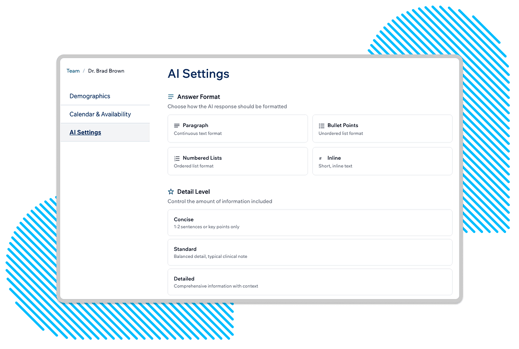
Different clinicians document differently. New per-user AI Settings let each team member set their own defaults independently, so AI output matches how they actually write. Options include:
- Format: Paragraph, bullet points, numbered lists, or inline text
- Detail level: Concise (key points only), Standard (balanced clinical note), or Detailed (comprehensive with full context)
These settings apply across both AI Scribe and AI Chat. Because settings are per-user, a physician and an MA on the same team can each configure their own preferences without affecting each other.
Q: Do AI Settings apply to both AI Scribe and AI Chat?
Yes. Format and detail level preferences set in AI Settings apply across both tools, so documentation stays consistent regardless of which one is being used.
Resume a Recording if a Visit Is Interrupted
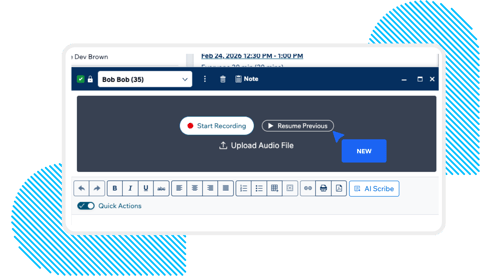
If an AI Scribe recording stops mid-visit due to a connectivity issue or any other disruption, clinicians can now resume it without losing what was already captured. Selecting Resume picks up the previous recording where it left off.
This reduces the need to restart recordings from scratch or contact support when something goes wrong — a small but meaningful improvement for busy clinic days.
Q: What happens to audio that was captured before a recording was interrupted?
It's preserved. Resuming a recording continues from where it stopped, and the complete audio — including what was captured before the interruption — is used to generate the final note.
Mobile-Optimized Views for Patient Communications
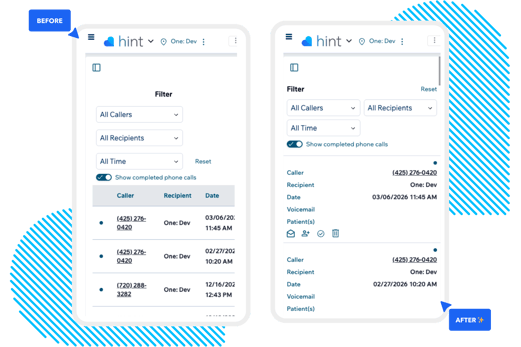
Communications pages, including phone calls, lab results, faxes, and forms, now use a stacked card layout on mobile instead of a horizontally scrolling table. Information is easier to read, scroll, and act on without pinching or sideways scrolling.
🔧 Membership Management Updates
Hint Core handles patient enrollment, autopay, invoicing, agreements, and recurring billing, replacing the patchwork of tools many practices use to manage membership-based care. This month’s update focuses on making multi-membership billing easier to understand and manage.
See Autopay Status Across All Memberships at Once
Hint Core supports enrolling patients in multiple memberships simultaneously. For example, a primary DPC membership alongside a weight management or behavioral health program, each with independent billing rules and payment methods.
With multiple memberships comes a practical question that previously required extra clicks to answer: which card is set to autopay for which plan? Now, the patient's Payment Methods tab shows which payment method is assigned to each membership directly, with no need to open each membership individually to verify. The autopay copy has also been updated to make it clearer where default settings are configured.
-1.gif?width=568&height=378&name=HubSpot%20Image%20Template%20(1920%20x%201280%20px)-1.gif)
Q: Does Hint Core support different payment methods for different memberships?
Yes. Each membership can have its own assigned payment method and billing rules. The Payment Methods tab now surfaces which method is set to autopay for each membership, so staff can verify and manage payment assignments in one place.
🐛 Bug Fixes
A few issues have been resolved:
- NPI deletion: Removing an NPI from a provider profile and saving now fully deletes the record. Previously, the number would reappear after saving.
- File and folder creation: Creating a new folder from a patient profile now correctly saves to that patient's file drive, not the top-level practice drive.
- Patient task updates: Updating a task with an assigned patient now reflects immediately on the patient's profile without requiring a page refresh.
Built for Direct Care. Designed to Get Out of Your Way.
Hint is purpose-built for membership-based practices. Hint Clinical and Hint Core are designed around the direct care model with tools for patient sign-up, billing, clinical documentation, and practice operations all built to work together. These updates are part of a sustained investment in making the platform faster and more flexible for practices at every stage of growth.
Want to see how Hint can support your practice?
.svg)